
Interactive Kiosks: Why Self-Service Technology Is Transforming Customer Experiences
Customer expectations have changed dramatically over the past decade. Today, people expect faster service, instant access to information, and more control over their experiences. As a result, businesses across nearly every industry are investing in interactive kiosk technology to improve customer engagement and operational efficiency.
Unlike traditional static signage, interactive kiosks allow users to actively engage with content, search for information, complete transactions, and navigate facilities. Furthermore, they provide organizations with a scalable way to deliver information while reducing staff workload.
Because customers increasingly prefer convenience and self-service options, interactive kiosks have become one of the fastest-growing technologies in retail, healthcare, hospitality, education, transportation, museums, and corporate environments. Consequently, organizations can serve visitors more efficiently while creating a more modern experience.
What Is an Interactive Kiosk?
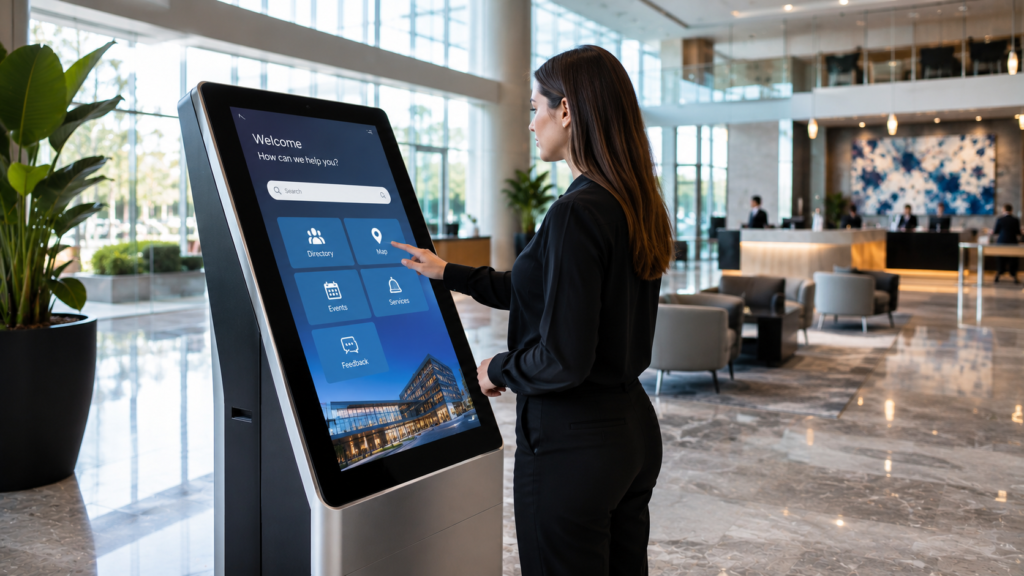
An interactive kiosk is a self-service digital display that allows users to access information, complete tasks, or interact with digital content through a touch screen or another interface.
Unlike passive displays that simply show content, interactive kiosks encourage direct participation. As a result, users can control the experience instead of waiting for assistance.
Common kiosk functions include:
- Wayfinding
- Product browsing
- Self-check-in
- Ticket purchasing
- Visitor registration
- Information lookup
- Interactive exhibits
- Digital directories
- Self-service ordering
Because users control the interaction, interactive kiosks often increase engagement while improving convenience. Additionally, they help organizations deliver consistent information across multiple locations.
Why Interactive Kiosks Continue to Grow
Modern consumers value speed, convenience, and self-service options. Therefore, organizations are deploying kiosks to meet changing expectations.
Key benefits include:
- Reduced wait times
- Improved customer satisfaction
- Increased engagement
- Better information access
- Lower staffing requirements
- Enhanced visitor experiences
- Consistent information delivery
Additionally, interactive kiosks allow organizations to update content instantly. As a result, businesses can adapt messaging without replacing physical materials. Moreover, they can use kiosks to support seasonal campaigns, new services, updated directories, and changing visitor needs.
Interactive Kiosks for Retail Stores
Retailers increasingly use kiosks to create better shopping experiences.
Because customers often want quick access to product information, kiosks help bridge the gap between physical and digital retail. In addition, they give shoppers more control over how they explore products and services.
Applications include:
Product Information
Customers can browse specifications, inventory availability, pricing, product images, and comparisons. As a result, shoppers can make more informed decisions without waiting for a sales associate.
Endless Aisle Solutions
Retailers can display products that may not be physically available in the store. Therefore, stores can expand product access without increasing floor space.
Loyalty Programs
Customers can enroll in rewards programs, access account information, and view personalized offers.
Furthermore, kiosks help reduce pressure on sales staff while giving shoppers greater control over their purchasing journey. Consequently, employees can focus on higher-value customer interactions.
Interactive Kiosks for Healthcare Facilities
Healthcare organizations frequently deploy kiosks to improve patient experiences and streamline operations.
Common applications include:
- Patient check-in
- Appointment verification
- Wayfinding
- Visitor registration
- Health information access
Because healthcare facilities often experience high visitor volume, kiosks can help reduce congestion and improve operational efficiency. Additionally, self-service check-in systems can reduce wait times and improve patient satisfaction.
Moreover, kiosks can help visitors find departments, appointment locations, and important facility information more easily. As a result, healthcare environments can feel less confusing and more organized.
Interactive Kiosks for Museums
Museums continue adopting interactive technology to enhance education and engagement.
Because visitors learn in different ways, interactive kiosks help museums provide information in a more flexible format. Instead of relying only on printed placards, museums can offer videos, maps, animations, timelines, and searchable archives.
Applications include:
Interactive Exhibits
Visitors can explore additional content related to exhibits and artifacts. Consequently, they can move beyond surface-level information and engage more deeply with the subject.
Digital Archives
Museums can provide access to expanded collections that may not be physically displayed. Therefore, visitors can explore more content without requiring more exhibit space.
Educational Experiences
Visitors can engage with timelines, maps, videos, and interactive learning content. In addition, kiosks can support multiple languages and accessibility features.
Consequently, museums can create richer educational experiences while supporting a broader range of learning styles.
Interactive Kiosks for Corporate Environments
Corporate facilities increasingly use kiosks to improve visitor experiences and communication.
Applications include:
- Visitor registration
- Employee directories
- Wayfinding
- Conference room scheduling
- Company information displays
Because corporate campuses can be complex, interactive kiosks help visitors navigate efficiently. Furthermore, kiosks can reduce reception workload by guiding guests through check-in and wayfinding steps.
Moreover, they create a modern and technology-focused first impression. As a result, customers, investors, and partners experience the organization as more polished and innovative.
Interactive Kiosks for Universities
Universities often need to communicate information to large numbers of students, staff, and visitors.
Interactive kiosks support:
- Campus maps
- Event schedules
- Building directories
- Student resources
- Visitor information
Additionally, universities can use kiosks to improve campus navigation while reducing the burden on administrative staff. Therefore, students and visitors can access information more quickly.
As a result, both students and visitors benefit from easier access to campus resources and directions. Likewise, schools can maintain updated information across multiple buildings and departments.
Interactive Kiosks for Airports and Transportation
Transportation facilities require fast and accurate information delivery.
Therefore, airports and transit centers frequently deploy kiosks for:
- Wayfinding
- Ticketing
- Passenger information
- Flight information
- Visitor assistance
Because these environments serve large numbers of travelers, self-service systems help improve efficiency while reducing confusion. Additionally, kiosks can provide multilingual support, which improves accessibility for international travelers.
Consequently, transportation facilities can improve passenger flow and reduce pressure on staff.
Interactive Kiosks vs Traditional Signage
| Feature | Interactive Kiosk | Traditional Signage |
|---|---|---|
| User Interaction | Yes | No |
| Real-Time Updates | Yes | No |
| Search Capability | Yes | No |
| Self-Service Functions | Yes | No |
| Personalized Experience | Yes | No |
| Data Collection | Yes | No |
| Engagement Level | High | Low |
Although traditional signage remains useful for basic communication, interactive kiosks provide significantly greater functionality and engagement.
Therefore, organizations seeking improved customer experiences often choose kiosk technology. In contrast, static signs work best when the message rarely changes and does not require user interaction.
Touch Screen Technology and User Experience
The effectiveness of a kiosk depends heavily on user experience.
Important considerations include:
- Screen size
- Touch responsiveness
- Interface design
- Accessibility
- Content organization
- Ease of navigation
Because users expect intuitive interactions, a poorly designed kiosk can create frustration rather than engagement. Therefore, organizations should focus on both hardware and software design when planning deployments.
Additionally, screen placement matters. For example, kiosks should be installed where visitors naturally pause, search, or make decisions.
Common Mistakes When Deploying Interactive Kiosks
Many organizations focus primarily on hardware while overlooking the user experience.
Common mistakes include:
- Complex navigation
- Poor content organization
- Slow software performance
- Insufficient accessibility features
- Poor screen placement
- Lack of content updates
Because kiosks represent a direct customer touchpoint, usability should remain a top priority. Moreover, content should be reviewed and updated regularly to keep the system useful.
As a result, successful kiosk deployments require thoughtful planning, not just attractive hardware.
Future Trends in Interactive Kiosks
Interactive kiosk technology continues evolving rapidly.
Emerging trends include:
- AI-powered assistance
- Voice interaction
- Contactless experiences
- Mobile device integration
- Facial recognition
- Personalized content
- Real-time analytics
Furthermore, kiosks increasingly integrate with digital signage, LED displays, transparent OLED technology, and customer management systems.
As a result, organizations can create more connected and intelligent visitor experiences. Over time, kiosks will become more personalized, data-driven, and integrated into complete digital ecosystems.
FAQ
What is an interactive kiosk?
An interactive kiosk is a self-service digital display that allows users to access information, complete transactions, or engage with content through a touch interface.
Where are interactive kiosks commonly used?
Interactive kiosks are used in retail stores, healthcare facilities, museums, airports, universities, corporate offices, and hospitality venues.
Can kiosks collect customer data?
Yes. Many kiosk systems can collect analytics, survey responses, registrations, and interaction data.
Are interactive kiosks customizable?
Yes. Organizations can customize hardware, software, branding, content, and functionality based on project requirements.
Why Choose Screen Solutions International
Screen Solutions International provides interactive kiosk solutions for organizations seeking modern self-service experiences.
SSI solutions include:
- Interactive Kiosks
- Touch Displays
- LED Video Walls
- Digital Signage Systems
- Transparent OLED Displays
- Digital Spheres
- Custom Experiential Technologies
Additionally, SSI helps clients evaluate user workflows, content strategy, hardware selection, software integration, and deployment planning. As a result, organizations can create interactive experiences that improve both engagement and operational efficiency.
Because SSI works across multiple display technologies, our team can also help integrate kiosks with LED walls, transparent OLED displays, digital signage networks, and immersive environments. Therefore, clients can build complete visitor experiences rather than isolated touchscreen stations.
Final Takeaway
Interactive kiosks have transformed how organizations communicate with visitors, customers, and employees. Because they provide self-service access to information while improving convenience and engagement, they continue to play a growing role across nearly every industry.
Ultimately, businesses that want to improve customer experiences, reduce operational friction, and modernize communication should consider interactive kiosk technology. With the right strategy and deployment partner, kiosks can become valuable tools that enhance both service and efficiency.
Sources
Internal SSI Links
- https://ssidisplays.com/
- https://ssidisplays.com/interactive-kiosks/
- https://ssidisplays.com/digital-signage/
- https://ssidisplays.com/touch-screen-kiosks/
External Authority Sources